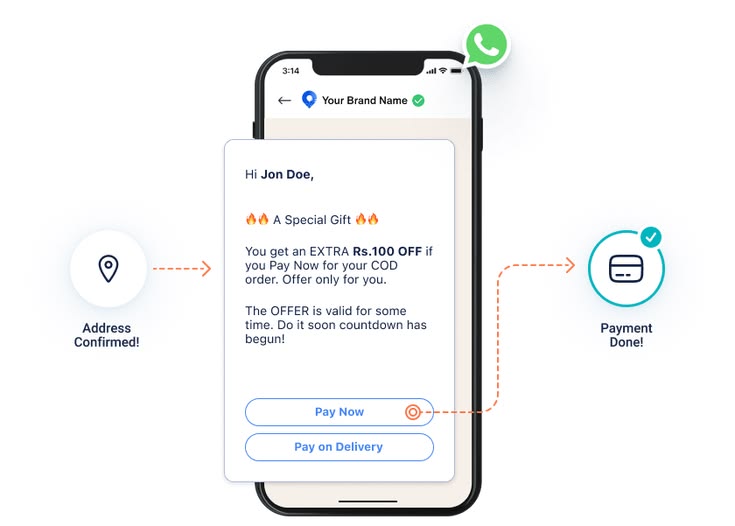
WhatsApp Order Confirmation Bots: Reduce COD Returns by 30%
Cash-on-delivery (COD) returns are one of the biggest profit killers for Indian e-commerce and D2C businesses. Every refused delivery increases logistics costs, ties up inventory, and impacts customer satisfaction. Products that are returned often require additional handling, repackaging, or quality checks before they can be sold again, further reducing margins.
Many COD orders are rejected because customers change their minds, enter incorrect delivery details, or simply are not available when the courier arrives. Since payment is collected only at delivery, customers can refuse the package without any financial commitment.
A WhatsApp Order Confirmation Bot solves this problem by confirming the customer's intent before dispatch. By automatically asking customers to confirm, modify, or cancel their order, businesses can eliminate unnecessary shipments and significantly reduce costly COD returns.
Why COD Returns Are So High—and Why WhatsApp Confirmation Works
Cash-on-delivery orders naturally experience higher return rates than prepaid orders because customers have not yet invested financially in the purchase. Without any upfront payment, it becomes easier to cancel, ignore delivery calls, or refuse the package when it arrives.
Adding a WhatsApp confirmation step before dispatch introduces an additional commitment from the customer, ensuring that only genuine orders proceed to shipping.
Impulse Orders Are Cancelled Before Shipping
Many customers place COD orders impulsively and later decide they no longer want the product. Instead of discovering this after the package reaches their doorstep, a WhatsApp confirmation message allows them to cancel the order before it leaves the warehouse.
This prevents unnecessary courier expenses, reverse logistics costs, and warehouse handling while improving operational efficiency.
Delivery Address Errors Are Identified Early
Incorrect addresses, missing landmarks, or outdated delivery details frequently cause failed deliveries. A WhatsApp confirmation bot can ask customers to verify their shipping address before dispatch, allowing corrections to be made immediately.
Resolving address issues before shipping reduces delivery failures and improves first-attempt delivery success rates.
Unreachable Customers Are Detected Before Dispatch
If the WhatsApp message cannot be delivered or receives no response after a reminder, the order can be flagged for manual verification or cancellation according to your business rules.
Instead of discovering that a customer is unreachable after the shipment has already been dispatched, businesses can identify high-risk orders before spending on logistics.
Customers Stay Engaged Throughout the Purchase Journey
Receiving a personalized WhatsApp message reassures customers that their order is being processed. It also creates an expectation that the shipment will arrive soon, making customers more likely to accept delivery when the courier arrives.
This additional engagement often leads to higher delivery acceptance rates and a better overall customer experience.
How a WhatsApp Order Confirmation Bot Works
The entire confirmation process is automated, requiring no manual intervention from your customer support or warehouse teams. Once an order is placed, the bot communicates directly with the customer, updates order status, and keeps your order management system synchronized in real time.
Step 1: Order Placed → Bot Triggered
As soon as a customer places a Cash-on-Delivery (COD) order through your website, mobile application, or e-commerce marketplace, your Order Management System (OMS) automatically triggers the WhatsApp bot using an API or webhook integration.
The trigger securely passes essential order information such as the customer's name, phone number, ordered products, order value, and delivery address. This happens instantly without requiring any manual intervention from your sales or support team.
Because the automation starts immediately after the order is created, customers receive their confirmation request while the purchase decision is still fresh, resulting in significantly higher response rates.
Step 2: Personalized WhatsApp Confirmation Message
After receiving the order information, the bot immediately sends a personalized WhatsApp message to the customer using an approved WhatsApp Business template.
Instead of sending a generic notification, the message includes personalized details such as the customer's name, ordered products, total order amount, and delivery address. This personalized communication increases customer trust and generates much higher engagement than traditional SMS messages.
A typical confirmation message may look like this:
Hi [Customer Name], your order for [Product Name] worth ₹[Amount] is ready for dispatch to:
[Delivery Address]
Reply:
✅ 1 – Confirm Order
✏️ 2 – Change Delivery Address
❌ 3 – Cancel Order
Giving customers clear response options makes the confirmation process simple while reducing unnecessary customer support interactions.
Step 3: Customer Replies → Order Status Updates Automatically
Once the customer responds, the WhatsApp bot automatically updates the order status inside your Order Management System or ERP without requiring manual data entry.
If the customer confirms the order, it is immediately released for picking, packing, and dispatch. If the customer chooses to cancel, the order is closed before warehouse processing begins, eliminating unnecessary shipping expenses.
When customers request an address change, the bot collects the updated information and either updates the order automatically or forwards it to the operations team for verification, depending on your workflow.
If there is no response within 12–24 hours, the bot can automatically send one reminder. Orders that remain unconfirmed can then be flagged for manual review or cancelled according to predefined business rules.
Step 4: Dispatch Notifications and Delivery Updates
The automation doesn't stop once the order is confirmed. After dispatch, the same WhatsApp bot can continue communicating with customers throughout the delivery journey.
Customers automatically receive shipping confirmations, courier tracking links, estimated delivery dates, and reminder messages before the package arrives. These updates keep customers informed and increase the likelihood that someone will be available to receive the shipment.
Keeping customers engaged after dispatch significantly reduces failed delivery attempts caused by customers being unavailable or unaware that their order is arriving.
What You Need to Set Up a WhatsApp Order Confirmation Bot
Implementing a WhatsApp Order Confirmation Bot is simpler than many businesses expect. Most modern e-commerce platforms and order management systems already support the integrations required to automate the entire confirmation workflow.
WhatsApp Business API Access
The first requirement is access to the WhatsApp Business API, which allows businesses to send automated messages at scale. Unlike the standard WhatsApp Business App, the API supports integrations with websites, ERPs, CRMs, and order management systems, making fully automated order confirmations possible.
Businesses typically obtain API access through an official WhatsApp Business Solution Provider (BSP). The verification and onboarding process generally takes between three and five business days, depending on business verification requirements.
Order Management System with API or Webhook Support
Your Order Management System (OMS) or e-commerce platform should be able to notify the bot whenever a new COD order is created. Most modern platforms—including Shopify, WooCommerce, Magento, Unicommerce, and custom ERP systems—support webhooks or APIs that trigger automated workflows.
This integration ensures that every eligible order automatically enters the confirmation workflow without requiring manual exports or data entry.
Bot Logic and Workflow Automation
The automation layer processes customer replies, updates order statuses, sends reminders, and communicates with your ERP or OMS. Depending on your existing technology stack, this logic can be built using automation platforms such as n8n, dedicated WhatsApp automation platforms, or custom-developed applications.
Well-designed workflows can also handle advanced scenarios such as address updates, delivery rescheduling, customer escalation, and automatic cancellation of unconfirmed orders.
Approved WhatsApp Message Templates
Business-initiated WhatsApp messages must use Meta-approved message templates. These templates are reviewed before use to ensure they comply with WhatsApp's messaging policies.
Order confirmation templates are generally approved within 24–48 hours, allowing businesses to begin automation quickly while maintaining compliance with WhatsApp Business guidelines.
Quick Implementation Timeline
For most businesses, a standard WhatsApp order confirmation solution can be implemented and integrated within one to two weeks. Existing ERP or OMS integrations often reduce deployment time even further.
Common Mistakes to Avoid
Although WhatsApp order confirmation is straightforward to implement, following a few best practices ensures higher response rates and better customer experience.
Sending Confirmation Messages Too Late
Timing is critical. Confirmation messages should ideally be sent within 15 to 30 minutes after the customer places the order. Delayed confirmations often receive fewer responses because the customer has already shifted attention elsewhere or forgotten the purchase.
Sending Too Many Messages
Over-communicating can frustrate customers. A single confirmation message followed by one reminder is generally sufficient. Excessive follow-up messages may feel intrusive and reduce customer satisfaction.
No Process for Customers Who Don't Respond
Every business should define a clear workflow for unresponsive customers. Depending on your operational policy, these orders can be automatically cancelled, held for manual verification, or released for dispatch after a predefined waiting period.
Having a consistent policy ensures operational efficiency while minimizing unnecessary shipping costs.
Frequently Asked Questions
Does this work for marketplace orders on Amazon or Flipkart?
Marketplace platforms control customer communication and typically do not share buyer phone numbers directly with sellers. WhatsApp Order Confirmation Bots work best for orders received through your own website, mobile application, or direct D2C sales channels.
What if the customer's phone number is not registered on WhatsApp?
The bot sends messages to the phone number entered during checkout. If that number is not linked to WhatsApp, businesses can configure an automatic SMS fallback to ensure the customer still receives the confirmation request.
Sunray Datalinks: WhatsApp Automation Solutions for E-commerce & D2C Brands
At Sunray Datalinks, we help e-commerce businesses, D2C brands, retailers, and distributors automate customer communication using the WhatsApp Business Platform. Our solutions are designed to reduce operational costs, improve customer engagement, and streamline the complete post-purchase experience.
From WhatsApp Order Confirmation Bots and delivery notifications to order tracking, customer support automation, payment reminders, and CRM integrations, we build automation workflows that fit seamlessly into your existing business processes.
Whether you're using Shopify, WooCommerce, Magento, Unicommerce, a custom ERP, or another order management system, our team integrates WhatsApp automation with your technology stack to eliminate manual work while improving customer satisfaction.
Reduce COD Returns Before They Become a Cost
Every unnecessary COD return affects your profitability through reverse logistics charges, warehouse handling, delayed inventory availability, and increased operational costs. As order volumes grow, even a small improvement in delivery acceptance can translate into significant monthly savings.
A WhatsApp Order Confirmation Bot allows businesses to verify customer intent before dispatch, identify incorrect addresses, cancel unwanted orders early, and keep customers informed throughout the delivery journey. The result is fewer refused deliveries, better customer engagement, and a more efficient fulfilment process.
Because the entire workflow is automated, your operations team spends less time making confirmation calls while your warehouse processes only verified orders. This not only improves productivity but also creates a better experience for your customers.
For businesses handling large volumes of COD orders, WhatsApp confirmation is one of the fastest and highest-return automation investments available today.
Ready to Reduce Your COD Return Rate?
Automate order confirmations, reduce refused deliveries, and improve customer communication with a WhatsApp Order Confirmation Bot.
Sunray Datalinks helps e-commerce businesses implement end-to-end WhatsApp automation integrated with Shopify, WooCommerce, Magento, Unicommerce, custom ERPs, and other order management systems.
Discover how WhatsApp automation can reduce reverse logistics costs, improve delivery acceptance rates, and create a seamless post-purchase customer experience.
Book Free Consultation